Turn personal-CFO work into a real service line
You're probably already doing this for a few clients — bill-pay, oversight, a monthly check-in — stretched onto tools built for something else. Qualaby Pro is the first software actually built for it: a multi-client hub and a client-facing portal, both running on the same real ledger as Qualaby Home.
Sarah Chen
Every client's Health Score, cash cushion, and net worth — always current.
Every client, one hub.
Switch between households without switching tools. Each client's books live on the same real double-entry ledger as Qualaby Home — Cash Cushion, Net Worth, and Financial Health Score, per client, updating the moment a transaction posts. Clients log in to their own Qualaby and see their own books, live.
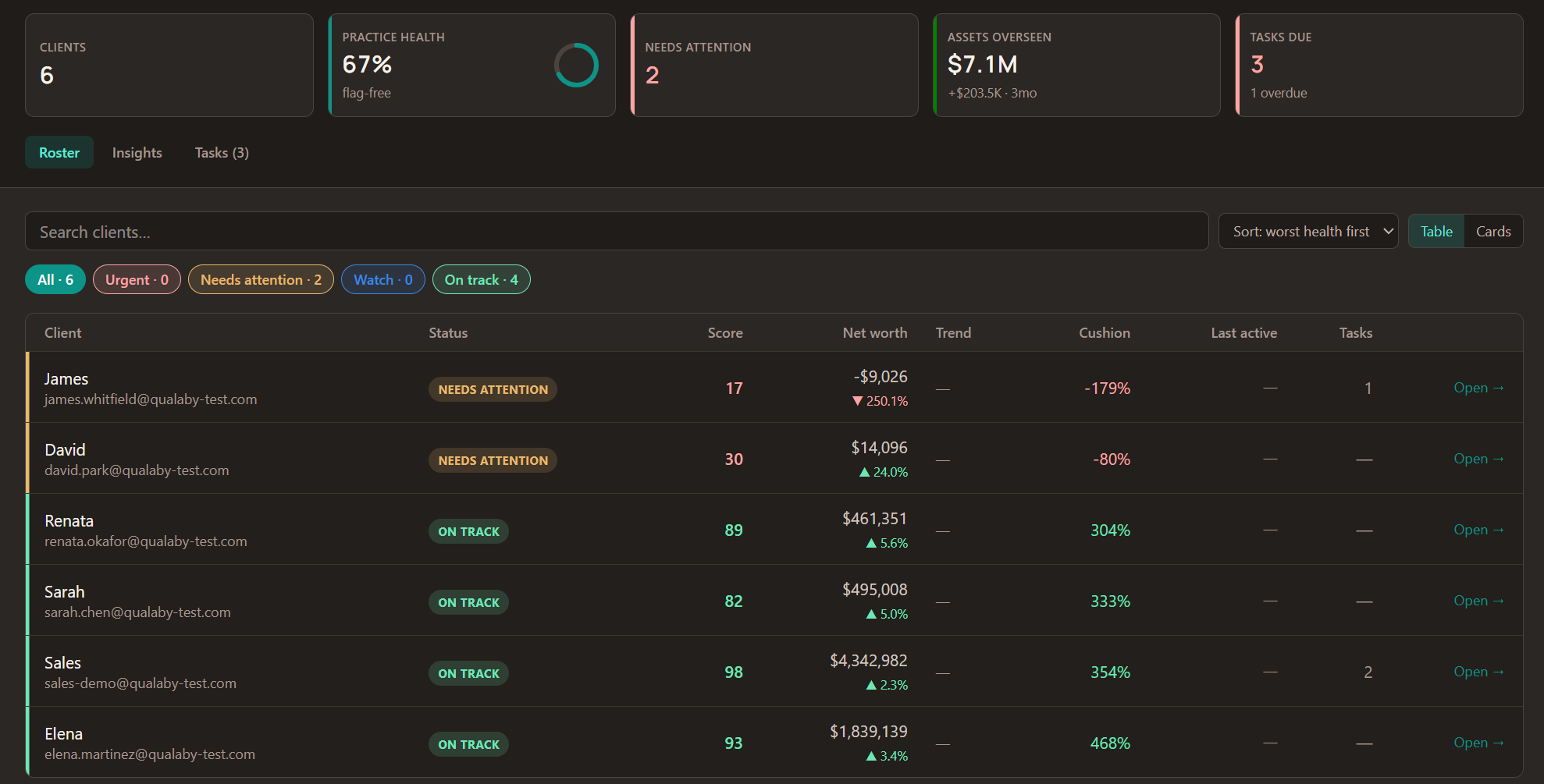
Every client's Health Score, net worth and trend, cash cushion, and last login on one screen, with the clients who need you at the top. Sample data shown.
Wholesale pricing when you host a client's full account — practice-friendly from client one.
Get early accessYou're already doing this — here's what scales it
Personal-CFO work usually starts as a spreadsheet, or a QuickBooks file per client. It works, until the client list grows. Qualaby Pro keeps each client on a real double-entry ledger and adds the practice side: a hub that shows who needs you first, and a login for every client.
| What you get | Excel or QuickBooks today | Qualaby Pro |
|---|---|---|
| Every client | One file or QuickBooks company per client. To check on one, you open it. | One roster with each client's Financial Health Score, net worth and trend, and cash cushion, calculated from their own ledger. |
| Who needs you | You find out when a client emails, or at the next review. | A low cash cushion, no login in 30+ days, or a month left open gets flagged, and that client moves to the top. |
| Follow-ups | Reminders in your inbox or a separate task app. | One task list across your practice: overdue, due this week, upcoming. Click a task to jump to the client. |
| Client view | Emailed spreadsheets and PDFs. | Clients log in to their own Qualaby and see their own books, live. |
| Access | Often a shared file or a shared login. | Clients grant you access by email and can revoke it any time. You stay signed in as yourself, and every visit is logged. |
| Switching clients | Close one file, open the next. | Open a client's Home from the roster. A banner always shows which client you have open, and Switch client takes you back. |
| The books | Business software bent to fit a household, or a spreadsheet with no ledger behind it. | The same real double-entry ledger as Qualaby Home: a chart of accounts, journal entries, and statements that tie out. |
Client advisory services keeps growing: the AICPA & CPA.com 2024 CAS benchmark survey (2023 data) found median net client fees of $156,250 per CAS professional, and median revenue growth of 17%.
Know who needs you, then act on it
The hub flags what needs attention and tracks your follow-ups. Every client keeps their own login. And it all sits on the same real ledger as Qualaby Home.
A roster built for triage
Every client on one screen: Financial Health Score, net worth with a three-month change and trend, cash cushion, last login, and open tasks. Search by name, filter by status, and sort the clients who need you to the top.
Flags that find the problem
A cash cushion under target, no login in 30+ days, a month left open: the hub flags each one automatically, so a quiet problem doesn't wait for the next review.
One task list for the whole practice
Every open task across every client in one list: overdue, due this week, and upcoming. Check one off as you finish it, or click through to its client.
Clients stay in control
Clients decide who has access: they can grant it by email and revoke it any time. You stay signed in as yourself, a banner shows which client you have open, and every visit is logged.
The rest of Qualaby Pro
Insights across your book
Practice health by status, assets overseen against three months ago, and your lowest cash cushions ranked.
A closer look
Click any client for a side panel with the five Health Score factors, open flags, and open tasks, without leaving the roster.
Open a client's Home
One click from the roster into a client's Home. You stay signed in as yourself, and Switch client takes you back.
Invite by email
Add a client from the hub with just their email address. They get an invitation and their own Qualaby login.
Client portal
Clients log in to their own Qualaby and see their own books, live: dashboard, statements, and Health Score.
Same real GL as Qualaby Home
Every client's books on the same double-entry foundation. Nothing simplified for the client side.
Wholesale client pricing
Practice-friendly rates when you host a client's full account.
AI-flagged patterns Coming soon
Spending shifts and allocation opportunities, surfaced for your review before anything reaches a client.
Modifiable summary emails Coming soon
A drafted monthly update per client, yours to edit before it goes out.
Built for the practice you're already building
Solo CPAs
Offering family-office or personal-CFO services on the side, or full time.
Small firms
Building out a personal CAS line without stretching business tools to fit.
Spreadsheet-first practices
You've built something that works in Excel — this is what it looks like once client households need to scale past it.
Ready to bring your clients on?
Early access is invite-only for now. Join the waitlist and we'll email you when it opens.
Join the Waitlist